1. 서론
디버거
컴퓨터과학에서는실수로 발생한 프로그램의 결함을 버그(bug)라고 하는데, 이미 완성된 코드에서 버그를 찾는 것은 어렵습니다. 그래서 이런 어려움을 해소하고자 디버거(Debugger)라는 도구가 개발되었습니다.
디버거는 문자 그대로 버그를 없애기 위해 사용하는 도구입니다. 프로그램을 어셈블리 코드 단위로 실행하면서, 실행 결과를 사용자에게 보여줍니다.
그러나 이러한 디버거의 효용을 개발자만 얻는 것은 아닙니다. 해커, 리버스 엔지니어 등을 비롯하여 소프트웨어에서 버그를 찾고자 하는 모두가 이 도구를 사용하여 버그를 효율적으로 탐색할 수 있습니다.
이번에는 리눅스의 대표적인 디버거 중 하나인 gdb의 기능들에 대해 배우고, 실습을 통해 사용법을 익혀보겠습니다.
2. gdb & pwndbg
gdb
gdb(GNU debugger)는 리눅스의 대표적인 디버거입니다. 오픈 소스로 개발되어 무료로 설치할 수 있으며, 오래된만큼 다양한 플러그인들이 개발되어 있습니다. 우리가 사용하는 Ubuntu 18.04에는 기본적으로 설치되어 있습니다.
gdb의 플러그인 중에서 바이너리 분석 용도로 널리 사용되는 플러그인들은 다음과 같습니다.
GitHub - pwndbg/pwndbg: Exploit Development and Reverse Engineering with GDB Made Easy
Exploit Development and Reverse Engineering with GDB Made Easy - GitHub - pwndbg/pwndbg: Exploit Development and Reverse Engineering with GDB Made Easy
github.com
설치를 마친 후, 터미널에 gdb를 입력했을 때, 아래와 같은 실행 결과가 나오면 설치에 성공한 것입니다.
$ gdb
GNU gdb (Ubuntu 8.1-0ubuntu3.2) 8.1.0.20180409-git
Copyright (C) 2018 Free Software Foundation, Inc.
License GPLv3+: GNU GPL version 3 or later
This is free software: you are free to change and redistribute it.
There is NO WARRANTY, to the extent permitted by law.  Type "show copying"
and "show warranty" for details.
This GDB was configured as "x86_64-linux-gnu".
Type "show configuration" for configuration details.
For bug reporting instructions, please see:
Find the GDB manual and other documentation resources online at:
For help, type "help".
Type "apropos word" to search for commands related to "word".
pwndbg: loaded 193 commands. Type pwndbg [filter] for a list.
pwndbg: created $rebase, $ida gdb functions (can be used with print/break)
pwndbg>
실습 예제
간단한 코드를 작성하고, 이를 분석하며 gdb의 사용법을 익혀보겠습니다. 우선 아래의 코드를 작성하고 컴파일합니다.
// Name: debugee.c
// Compile: gcc -o debugee debugee.c -no-pie
#include <stdio.h>
int main(void) {
  int sum = 0;
  int val1 = 1;
  int val2 = 2;
  sum = val1 + val2;
  printf("1 + 2 = %d\\n", sum);
  return 0;
}
그 다음 gdb debugee로 디버깅을 시작합니다.
$ gcc -o debugee debugee.c
$ gdb debugee
GNU gdb (Ubuntu 8.1-0ubuntu3.2) 8.1.0.20180409-git
Copyright (C) 2018 Free Software Foundation, Inc.
License GPLv3+: GNU GPL version 3 or later <http://gnu.org/licenses/gpl.html>
This is free software: you are free to change and redistribute it.
There is NO WARRANTY, to the extent permitted by law.  Type "show copying"
and "show warranty" for details.
This GDB was configured as "x86_64-linux-gnu".
Type "show configuration" for configuration details.
For bug reporting instructions, please see:
<http://www.gnu.org/software/gdb/bugs/>.
Find the GDB manual and other documentation resources online at:
<http://www.gnu.org/software/gdb/documentation/>.
For help, type "help".
Type "apropos word" to search for commands related to "word"...
pwndbg: loaded 193 commands. Type pwndbg [filter] for a list.
pwndbg: created $rebase, $ida gdb functions (can be used with print/break)
Reading symbols from debugee...(no debugging symbols found)...done.
pwndbg>
start
리눅스는 실행파일의 형식으로 ELF(Executable and Linkable Format)를 규정하고 있습니다. ELF는 크게 헤더와 여러 섹션들로 구성되어 있습니다. 헤더에는 실행에 필요한 여러 정보가 적혀 있고, 섹션들에는 컴파일된 기계어 코드, 프로그램 문자열을 비롯한 여러 데이터가 포함되어 있습니다.
ELF의 헤더 중에 진입점(Entry Point, EP)이라는 필드가 있는데, 운영체제는 ELF를 실행할 때, 진입점의 값부터 프로그램을 실행합니다. readelf로 확인해본 결과, debugee의 진입점은 0x400400입니다.
$ readelf -h debugee
ELF Header:
  Magic:   7f 45 4c 46 02 01 01 00 00 00 00 00 00 00 00 00
  Class:                             ELF64
  Data:                              2's complement, little endian
  Version:                           1 (current)
  OS/ABI:                            UNIX - System V
  ABI Version:                       0
  Type:                              EXEC (Executable file)
  Machine:                           Advanced Micro Devices X86-64
  Version:                           0x1
  Entry point address:               0x400400
  Start of program headers:          64 (bytes into file)
  Start of section headers:          6376 (bytes into file)
  Flags:                             0x0
  Size of this header:               64 (bytes)
  Size of program headers:           56 (bytes)
  Number of program headers:         9
  Size of section headers:           64 (bytes)
  Number of section headers:         29
  Section header string table index: 28
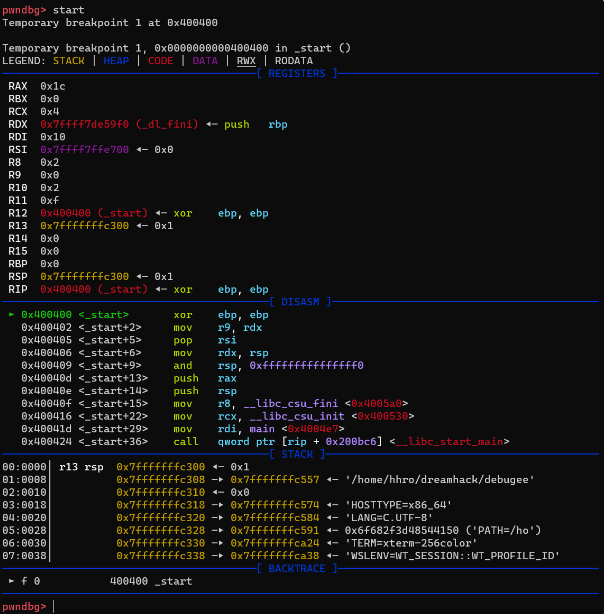
gdb의 start 명령어는 진입점부터 프로그램을 분석할 수 있게 해주는 gdb의 명령어입니다. DISASM영역의 화살표(►)가 가리키는 주소는 현재 rip의 값인데, start명령어를 실행하고 보면 0x400400을 가리키고 있습니다. 이는 앞서 살펴본 프로그램 진입점의 주소와 일치합니다.
pwndbg> start
Temporary breakpoint 1 at 0x400400
Temporary breakpoint 1, 0x0000000000400400 in _start ()
[중략]
───────────────────────────[ DISASM ]─────────────────────────────
 ► 0x400400 <_start>       xor    ebp, ebp
   0x400402 <_start+2>     mov    r9, rdx
   0x400405 <_start+5>     pop    rsi
   0x400406 <_start+6>     mov    rdx, rsp
   0x400409 <_start+9>     and    rsp, 0xfffffffffffffff0
   0x40040d <_start+13>    push   rax
   0x40040e <_start+14>    push   rsp
   0x40040f <_start+15>    mov    r8, __libc_csu_fini <0x4005a0>
   0x400416 <_start+22>    mov    rcx, __libc_csu_init <0x400530>
   0x40041d <_start+29>    mov    rdi, main <0x4004e7>
   0x400424 <_start+36>    call   qword ptr [rip + 0x200bc6] <__libc_start_main>
[중략]
pwndbg>
context
프로그램은 실행되면서 레지스터를 비롯한 여러 메모리에 접근합니다. 따라서 디버거를 이용하여 프로그램의 실행 과정을 자세히 관찰하려면 컴퓨터의 각종 메모리를 한눈에 파악할 수 있는 것이 좋습니다. pwndbg는 주요 메모리들의 상태를 프로그램이 실행되고 있는 맥락(Context)이라고 부르며, 이를 가독성 있게 표현할 수 있는 인터페이스를 갖추고 있습니다.
context는 크게 4개의 영역으로 구분됩니다.
- registers: 레지스터의 상태를 보여줍니다.
- disasm: rip부터 여러 줄에 걸쳐 디스어셈블된 결과를 보여줍니다.
- stack: rsp부터 여러 줄에 걸쳐 스택의 값들을 보여줍니다.
- backtrace: 현재 rip에 도달할 때까지 어떤 함수들이 중첩되어 호출됐는지 보여줍니다. 곧 예시를 들어 더 자세히 설명하겠습니다.
이들은 어셈블리를 실행할 때마다 갱신되어 방금 실행한 어셈블리 명령어가 메모리에 어떤 영향을 줬는지 쉽게 파악할 수 있게 돕습니다.
break & continue
gdb를 이용하여 프로그램을 분석할 때, 일반적으로 전체 프로그램 중 아주 일부분의 동작에만 관심이 있습니다. 이 예제에서 main 함수가 분석의 대상이라고 가정하겠습니다. 이런 상황에서, 진입점부터 main 함수까지 코드를 한 줄씩 실행시켜가며 main 함수에 도달해야 한다면, 디버깅이 효율적이지 않습니다.
그래서 많은 디버거에는 break와 continue라는 기능이 있습니다. break는 특정 주소에 중단점(breakpoint)을 설정하는 기능이고, continue는 중단된 프로그램을 계속 실행시키는 기능입니다. break로 원하는 함수에 중단점을 설정하고, 프로그램을 계속 실행하면 해당 함수까지 멈추지 않고 실행한 다음 중단됩니다. 그러면 중단된 지점부터 다시 세밀하게 분석할 수 있습니다.
이들을 활용하여 현재 중단된 start 함수부터 main 함수까지 실행시키겠습니다.
pwndbg> b *main
Breakpoint 2 at 0x4004e7
pwndbg> c
Continuing.
Breakpoint 2, 0x00000000004004e7 in main ()
[중략]
──────────────────────────[ DISASM ]─────────────────────────
 ► 0x4004e7 <main>       push   rbp <0x400530>
   0x4004e8 <main+1>     mov    rbp, rsp
   0x4004eb <main+4>     sub    rsp, 0x10
   0x4004ef <main+8>     mov    dword ptr [rbp - 0xc], 0
   0x4004f6 <main+15>    mov    dword ptr [rbp - 8], 1
   0x4004fd <main+22>    mov    dword ptr [rbp - 4], 2
   0x400504 <main+29>    mov    edx, dword ptr [rbp - 8]
   0x400507 <main+32>    mov    eax, dword ptr [rbp - 4]
   0x40050a <main+35>    add    eax, edx
   0x40050c <main+37>    mov    dword ptr [rbp - 0xc], eax
   0x40050f <main+40>    mov    eax, dword ptr [rbp - 0xc]
──────────────────────────[ STACK ]───────────────────────────
[생략]
run
앞의 start가 진입점부터 프로그램을 분석할 수 있도록 자동으로 중단점을 설정해줬다면, run은 단순히 실행만 시킵니다. 따라서 중단점을 설정해놓지 않았다면 프로그램이 끝까지 멈추지 않고 실행됩니다. 지금은 main 함수에 중단점을 설정해놨기 때문에 run명령어를 실행해도, main 함수에서 실행이 멈춥니다.
pwndbg>r
Starting program: /home/dreamhack/debugee
Breakpoint 2, 0x00000000004004e7 in main ()gdb는 훌륭한 명령어 축약 기능을 제공합니다. 어떤 명령어를 특정할 수 있는 최소한의 문자열만 입력하면 자동으로 명령어를 찾아 실행해줍니다. 몇몇 대표적인 명령어들(break, continue, run 등)은 특정할 수 없더라도 우선으로 실행해줍니다. 다음은 자주 사용되는 명령어들의 단축키 예입니다.
|
disassembly
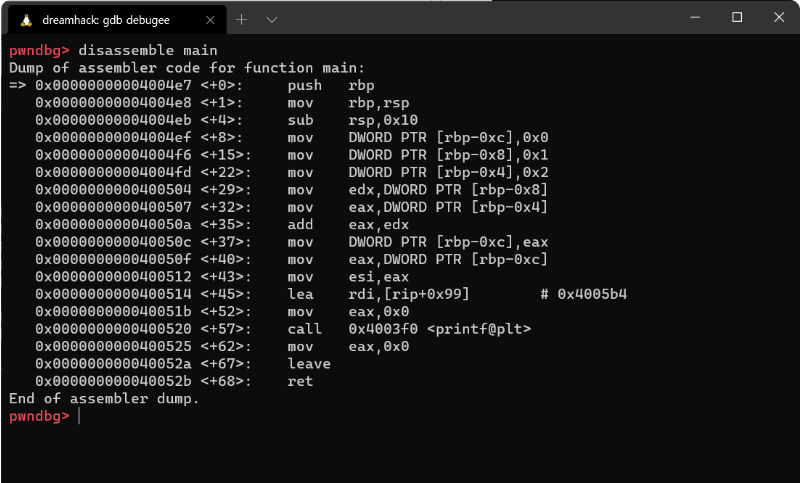
gdb는 프로그램을 어셈블리 코드 단위로 실행하고, 결과를 보여줍니다. 프로그램의 코드는 기계어로 이루어져 있으므로, gdb는 기계어를 디스어셈블(Disassemble)하는 기능을 기본적으로 탑재하고 있습니다. 추가로, pwndbg에는 디스어셈블된 결과를 가독성 좋게 출력해주는 기능이 있습니다. 각각을 살펴보겠습니다.
disassemble은 gdb가 기본적으로 제공하는 디스어셈블 명령어입니다. 아래와 같이 함수 이름을 인자로 전달하면 해당 함수가 반환될 때 까지 전부 디스어셈블하여 보여줍니다.
gdb disassembly
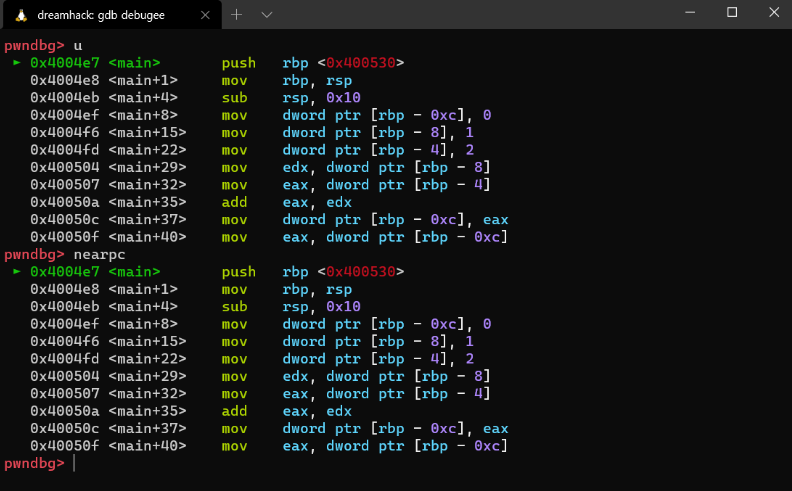
u, nearpc, pdisassemble는 pwndbg에서 제공하는 디스어셈블 명령어입니다. 디스어셈블된 코드를 가독성 좋게 출력해줍니다.
pwndbg disassembly
navigate
관찰하고자 하는 함수의 중단점에 도달했으면, 그 지점부터는 명령어를 한 줄씩 자세히 분석해야 합니다. 이때 사용하는 명령어로 ni와 si가 있습니다.
ni와 si는 모두 어셈블리 명령어를 한 줄 실행한다는 공통점이 있습니다. 그러나 만약 call 등을 통해 서브루틴을 호출하는 경우 ni는 서브루틴의 내부로 들어가지 않지만, si는 서브루틴의 내부로 들어간다는 차이점이 있습니다. 이를 확인하기 위해 일단 main 함수에서 printf 함수를 호출하는 지점까지 실행하겠습니다.
pwndbg> b *main+57
Breakpoint 2 at 0x400520
pwndbg> c
Continuing.
Breakpoint 3, 0x0000000000400520 in main ()
...
──────────────────────────────────[ DISASM ]───────────────────────────────────
   0x40050c <main+37>            mov    dword ptr [rbp - 0xc], eax
   0x40050f <main+40>            mov    eax, dword ptr [rbp - 0xc]
   0x400512 <main+43>            mov    esi, eax
   0x400514 <main+45>            lea    rdi, [rip + 0x99]
   0x40051b <main+52>            mov    eax, 0
 ► 0x400520 <main+57>            call   printf@plt <printf@plt>
        format: 0x4005b4 ◂— '1 + 2 = %d\\n'
        vararg: 0x3
   0x400525 <main+62>            mov    eax, 0
   0x40052a <main+67>            leave
   0x40052b <main+68>            ret
   0x40052c                      nop    dword ptr [rax]
   0x400530 <__libc_csu_init>    push   r15
...
next instruction
ni를 입력하면, 아래와 같이 printf 함수 바로 다음으로 rip가 이동한 것을 확인할 수 있습니다.
pwndbg> ni
0x0000000000400525 in main ()
...
──────────────────────────────────[ DISASM ]───────────────────────────────────
   0x40050f       <main+40>                  mov    eax, dword ptr [rbp - 0xc]
   0x400512       <main+43>                  mov    esi, eax
   0x400514       <main+45>                  lea    rdi, [rip + 0x99]
   0x40051b       <main+52>                  mov    eax, 0
   0x400520       <main+57>                  call   printf@plt <printf@plt>
 ► 0x400525       <main+62>                  mov    eax, 0
   0x40052a       <main+67>                  leave
   0x40052b       <main+68>                  ret
    ↓
   0x7ffff7a05b97 <__libc_start_main+231>    mov    edi, eax
   0x7ffff7a05b99 <__libc_start_main+233>    call   exit <exit>
   0x7ffff7a05b9e <__libc_start_main+238>    mov    rax, qword ptr [rip + 0x3ced23] <0x7ffff7dd48c8>
...printf가 출력하고자 하는 문자열은 stdout의 버퍼에서 잠시 대기한 뒤 출력됩니다. 여기서 버퍼는 '데이터가 목적지로 이동하기 전에 잠시 저장되는 장소'라는 의미입니다. stdout버퍼는 특정 조건이 만족됐을 때만 데이터를 목적지로 이동시키는데, 그 조건은 다음과 같습니다.
|
step into
printf 함수를 호출하는 지점까지 다시 프로그램을 실행시킨 뒤, si를 입력하면 아래와 같이 printf 함수 내부로 rip가 이동한 것을 확인할 수 있습니다. 프로그램을 분석하다가, 어떤 함수의 내부까지 궁금할 때는 si를, 그렇지 않을 때는 ni를 사용합니다. 여기서 잠시 context하단의 Backtrace를 보면, main 함수에서 printf를 호출했으므로 main 함수 위에 printf 함수가 쌓인 것을 볼 수 있습니다.
pwndbg> si
0x00000000004003f0 in printf@plt ()
...
──────────────────────────────────[ DISASM ]───────────────────────────────────
 ► 0x4003f0       <printf@plt>                       jmp    qword ptr [rip + 0x200c22] <0x601018>
   0x4003f6       <printf@plt+6>                     push   0
   0x4003fb       <printf@plt+11>                    jmp    0x4003e0 <0x4003e0>
    ↓
   0x4003e0                                          push   qword ptr [rip + 0x200c22] <0x601008>
   0x4003e6                                          jmp    qword ptr [rip + 0x200c24] <_dl_runtime_resolve_xsavec>
    ↓
   0x7ffff7dec7a0 <_dl_runtime_resolve_xsavec>       push   rbx
   0x7ffff7dec7a1 <_dl_runtime_resolve_xsavec+1>     mov    rbx, rsp
   0x7ffff7dec7a4 <_dl_runtime_resolve_xsavec+4>     and    rsp, 0xffffffffffffffc0
   0x7ffff7dec7a8 <_dl_runtime_resolve_xsavec+8>     sub    rsp, qword ptr [rip + 0x210059] <0x7ffff7ffc808>
   0x7ffff7dec7af <_dl_runtime_resolve_xsavec+15>    mov    qword ptr [rsp], rax
   0x7ffff7dec7b3 <_dl_runtime_resolve_xsavec+19>    mov    qword ptr [rsp + 8], rcx
...
──────────────────────────────────[ BACKTRACE ]───────────────────────────────────
 ► f 0           4003f0 printf@plt
   f 1           400525 main+62
   f 2     7ffff7a05b97 __libc_start_main+231
────────────────────────────────────────────────────────────────────────────────
pwndbg>
finish
step into로 함수 내부에 들어가서 필요한 부분을 모두 분석했는데, 함수의 규모가 커서 ni로는 원래 실행 흐름으로 돌아가기 어려울 수 있습니다. 이럴 때는 finish라는 명령어를 사용하여 함수의 끝까지 한 번에 실행할 수 있습니다.
pwndbg> finish
Run till exit from #0  0x00000000004003f0 in printf@plt ()
0x0000000000400525 in main ()
...
───────────────────────────────────[ DISASM ]───────────────────────────────────
   0x400520       <main+57>                  call   printf@plt <printf@plt>
 ► 0x400525       <main+62>                  mov    eax, 0
   0x40052a       <main+67>                  leave
   0x40052b       <main+68>                  ret
    ↓
   0x7ffff7a05b97 <__libc_start_main+231>    mov    edi, eax
   0x7ffff7a05b99 <__libc_start_main+233>    call   exit <exit>
   0x7ffff7a05b9e <__libc_start_main+238>    mov    rax, qword ptr [rip + 0x3ced23] <0x7ffff7dd48c8>
   0x7ffff7a05ba5 <__libc_start_main+245>    ror    rax, 0x11
   0x7ffff7a05ba9 <__libc_start_main+249>    xor    rax, qword ptr fs:[0x30]
   0x7ffff7a05bb2 <__libc_start_main+258>    call   rax
   0x7ffff7a05bb4 <__libc_start_main+260>    mov    rax, qword ptr [rip + 0x3cecfd] <0x7ffff7dd48b8>
───────────────────────────────────[ STACK ]────────────────────────────────────
[생략]
pwndbg> finishRun till exit from #0  0x00000000004003f0 in printf@plt ()0x0000000000400525 in main ()...───────────────────────────────────[ DISASM ]───────────────────────────────────   0x400520       <main+57>                  call   printf@plt <printf@plt> ► 0x400525       <main+62>                  mov    eax, 0   0x40052a       <main+67>                  leave   0x40052b       <main+68>                  ret    ↓   0x7ffff7a05b97 <__libc_start_main+231>    mov    edi, eax   0x7ffff7a05b99 <__libc_start_main+233>    call   exit <exit>   0x7ffff7a05b9e <__libc_start_main+238>    mov    rax, qword ptr [rip + 0x3ced23] <0x7ffff7dd48c8>   0x7ffff7a05ba5 <__libc_start_main+245>    ror    rax, 0x11   0x7ffff7a05ba9 <__libc_start_main+249>    xor    rax, qword ptr fs:[0x30]   0x7ffff7a05bb2 <__libc_start_main+258>    call   rax   0x7ffff7a05bb4 <__libc_start_main+260>    mov    rax, qword ptr [rip + 0x3cecfd] <0x7ffff7dd48b8>───────────────────────────────────[ STACK ]────────────────────────────────────[생략]
examine
프로그램을 분석하다 보면 가상 메모리에 존재하는 임의 주소의 값을 관찰해야할 때가 있습니다. 이를 위해 gdb에서는 기본적으로 x라는 명령어를 제공합니다. x를 이용하면 특정 주소에서 원하는 길이만큼의 데이터를 원하는 형식으로 인코딩하여 볼수 있습니다.
Format letters are o(octal), x(hex), d(decimal), u(unsigned decimal), t(binary), f(float), a(address), i(instruction), c(char), s(string) and z(hex, zero padded on the left). Size letters are b(byte), h(halfword), w(word), g(giant, 8 bytes).
아래는 예시입니다.
1. rsp부터 80바이트를 8바이트씩 hex형식으로 출력
pwndbg> x/10gx $rsp
0x7fffffffc228: 0x00007ffff7a05b97      0x0000000000000001
0x7fffffffc238: 0x00007fffffffc308      0x0000000100008000
0x7fffffffc248: 0x00000000004004e7      0x0000000000000000
0x7fffffffc258: 0x71eb993d1f26e436      0x0000000000400400
0x7fffffffc268: 0x00007fffffffc300      0x0000000000000000
2. rip부터 5줄의 어셈블리 명령어 출력
pwndbg> x/5i $rip
=> 0x4004e7 <main>:     push   rbp
   0x4004e8 <main+1>:   mov    rbp,rsp
   0x4004eb <main+4>:   sub    rsp,0x10
   0x4004ef <main+8>:   mov    DWORD PTR [rbp-0xc],0x0
   0x4004f6 <main+15>:  mov    DWORD PTR [rbp-0x8],0x1
3. 특정 주소의 문자열 출력
pwndbg> x/s 0x400000
0x400000:       "\177ELF\002\001\001"
gdb / python argv
run 명령어의 인자로 $()와 함께 파이썬 코드를 입력하면 값을 전달할 수 있습니다. 다음은 파이썬에서 print 함수를 통해 출력한 값을 run 명령어의 인자로 전달하는 명령어입니다.
pwndbg> tele
00:0000│ rsp  0x7fffffffc228 —▸ 0x7ffff7a05b97 (__libc_start_main+231) ◂— mov    edi, eax
01:0008│      0x7fffffffc230 ◂— 0x1
02:0010│      0x7fffffffc238 —▸ 0x7fffffffc308 —▸ 0x7fffffffc557 ◂— '/home/dreamhack/debugee'
03:0018│      0x7fffffffc240 ◂— 0x100008000
04:0020│      0x7fffffffc248 —▸ 0x4004e7 (main) ◂— push   rbp
05:0028│      0x7fffffffc250 ◂— 0x0
06:0030│      0x7fffffffc258 ◂— 0x71eb993d1f26e436
07:0038│      0x7fffffffc260 —▸ 0x400400 (_start) ◂— xor    ebp, ebp
gdb / python input
이전과 같이 $()와 함께 파이썬 코드를 입력하면 값을 입력할 수 있습니다. 입력값으로 전달하기 위해서는 '<<<' 문자를 사용합니다. 다음은 앞서 배운 argv[1]에 임의의 값을 전달하고, 값을 입력하는 명령어입니다.
pwndbg> vmmap
LEGEND: STACK | HEAP | CODE | DATA | RWX | RODATA
          0x400000           0x401000 r-xp     1000 0      /home/dreamhack/debugee
          0x600000           0x601000 r--p     1000 0      /home/dreamhack/debugee
          0x601000           0x602000 rw-p     1000 1000   /home/dreamhack/debugee
    0x7ffff79e4000     0x7ffff7bcb000 r-xp   1e7000 0      /lib/x86_64-linux-gnu/libc-2.27.so
    0x7ffff7bcb000     0x7ffff7dcb000 ---p   200000 1e7000 /lib/x86_64-linux-gnu/libc-2.27.so
    0x7ffff7dcb000     0x7ffff7dcf000 r--p     4000 1e7000 /lib/x86_64-linux-gnu/libc-2.27.so
    0x7ffff7dcf000     0x7ffff7dd1000 rw-p     2000 1eb000 /lib/x86_64-linux-gnu/libc-2.27.so
    0x7ffff7dd1000     0x7ffff7dd5000 rw-p     4000 0
    0x7ffff7dd5000     0x7ffff7dfc000 r-xp    27000 0      /lib/x86_64-linux-gnu/ld-2.27.so
    0x7ffff7dd5000     0x7ffff7dfc000 rwxp    27000 0      <explored>
    0x7ffff7fe3000     0x7ffff7fe5000 rw-p     2000 0
    0x7ffff7ff7000     0x7ffff7ffa000 r--p     3000 0      [vvar]
    0x7ffff7ffa000     0x7ffff7ffc000 r-xp     2000 0      [vdso]
    0x7ffff7ffc000     0x7ffff7ffd000 r--p     1000 27000  /lib/x86_64-linux-gnu/ld-2.27.so
    0x7ffff7ffd000     0x7ffff7ffe000 rw-p     1000 28000  /lib/x86_64-linux-gnu/ld-2.27.so
    0x7ffff7ffe000     0x7ffff7fff000 rw-p     1000 0
    0x7ffffffdc000     0x7ffffffff000 rw-p    23000 0      [stack]
pwndbg>
💡 파일 매핑이란?
| 어떤 파일을 메모리에 적재하는 것을 파일 매핑이라고 합니다. (위 메모리 레이아웃에서 /home/dreamhack/debugee와 /lib/x86_64-linux-gnu/libc-2.27.so, /lib/x86_64-linux-gnu/ld-2.27.so가 매핑된 파일들입니다.) 리눅스에서는 ELF를 실행할 때, 먼저 ELF의 코드와 여러 데이터를 가상 메모리에 매핑하고, 해당 ELF에 링크된 공유 오브젝트(Shared Object, so)를 추가로 메모리에 매핑합니다. 공유 오브젝트는 윈도우의 DLL과 대응되는 개념으로, 자주 사용되는 함수들을 미리 컴파일해둔 것입니다. C언어의 printf, scanf 등이 리눅스에서는 libc(library C)에 구현되어 있습니다. 공유 오브젝트에 이미 구현된 함수를 호출할 때는 매핑된 메모리에 존재하는 함수를 대신 호출합니다. |
gdb / python
gdb를 통해 디버깅할 때 직접 입력할 수 없을 때가 있습니다. 예를 들어, 숫자와 알파벳이 아닌 값을 입력하는 상황입니다. 이러한 값은 이용자가 직접 입력할 수 없는 값이기 때문에 파이썬으로 입력값을 생성하고, 이를 사용해야 합니다. 파이썬을 이용하는 방법을 살펴보기에 앞서 아래 코드를 작성하고 컴파일합니다.
코드를 살펴보면, 프로그램의 인자로 전달된 값과 이용자로부터 입력받은 값을 출력하는 예제입니다.
// Name: debugee2.c
// Compile: gcc -o debugee2 debugee2.c -no-pie
#include <stdio.h>
#include <stdlib.h>
#include <string.h>
#include <unistd.h>
int main(int argc, char *argv[])
{
	char name[20];
	if( argc < 2 ) {
		printf("Give me the argv[2]!\n");
		exit(0);
	}
	memset(name, 0, sizeof(name));
	printf("argv[1] %s\n", argv[1]);
	read(0, name, sizeof(name)-1);
	printf("Name: %s\n", name);
	return 0;
}
그 뒤, gdb debugee2로 디버깅을 시작합니다.
$ gcc -o debugee2 debugee2.c
$ gdb debugee2
GNU gdb (Ubuntu 8.1-0ubuntu3.2) 8.1.0.20180409-git
Copyright (C) 2018 Free Software Foundation, Inc.
License GPLv3+: GNU GPL version 3 or later <http://gnu.org/licenses/gpl.html>
This is free software: you are free to change and redistribute it.
There is NO WARRANTY, to the extent permitted by law.  Type "show copying"
and "show warranty" for details.
This GDB was configured as "x86_64-linux-gnu".
Type "show configuration" for configuration details.
For bug reporting instructions, please see:
<http://www.gnu.org/software/gdb/bugs/>.
Find the GDB manual and other documentation resources online at:
<http://www.gnu.org/software/gdb/documentation/>.
For help, type "help".
Type "apropos word" to search for commands related to "word"...
pwndbg: loaded 193 commands. Type pwndbg [filter] for a list.
pwndbg: created $rebase, $ida gdb functions (can be used with print/break)
Reading symbols from debugee...(no debugging symbols found)...done.
pwndbg>
gdb / python argv
run 명령어의 인자로 $()와 함께 파이썬 코드를 입력하면 값을 전달할 수 있습니다. 다음은 파이썬에서 print 함수를 통해 출력한 값을 run 명령어의 인자로 전달하는 명령어입니다.
pwndbg> r $(python -c 'print "\xff"*100')
Starting program: /home/s0ngsari/a $(python -c 'print "\xff"*100')
argv[1] ????????????????????????????????????????????????????????????????????????????????????????????????????
gdb / python input
이전과 같이 $()와 함께 파이썬 코드를 입력하면 값을 입력할 수 있습니다. 입력값으로 전달하기 위해서는 '<<<' 문자를 사용합니다. 다음은 앞서 배운 argv[1]에 임의의 값을 전달하고, 값을 입력하는 명령어입니다.
r $(python -c 'print "\xff"*100') <<< $(python -c 'print "dreamhack"')
Starting program: /home/s0ngsari/a $(python -c 'print "\xff"*100') <<< $(python -c 'print "dreamhack"')
argv[1] ????????????????????????????????????????????????????????????????????????????????????????????????????
Name: dreamhack
3. 요약
명령어
- start: 진입점에 중단점을 설정하고, 실행
- break(b): 중단점 설정
- continue(c): 계속 실행
- disassemble: 디스어셈블 결과 출력
- u, nearpc, pd: 디스어셈블 결과 가독성 좋게 출력
- x: 메모리 조회
- run(r): 프로그램 처음부터 실행
- context: 레지스터, 코드, 스택, 백트레이스의 상태 출력
- nexti(ni): 명령어 실행, 함수 내부로는 들어가지 않음
- stepi(si): 명령어 실행, 함수 내부로 들어감
- telescope(tele): 메모리 조회, 메모리값이 포인터일 경우 재귀적으로 따라가며 모든 메모리값 출력
- vmmap: 메모리 레이아웃 출력
'💠보안·취약점 > 🔸시스템·운영체제' 카테고리의 다른 글
| File Descriptor (0) | 2022.08.12 |
|---|---|
| [ubuntu] pwntools 사용 실습 (0) | 2022.08.11 |
| quiz 파일 풀이 (0) | 2022.08.11 |
| [dreamhack] Background: Linux Memory Layout (0) | 2022.07.28 |
| [dreamhack] x86 assembly (0) | 2022.07.09 |


